奇怪的网络知识又增加了🥹为什么curl一个地址会失败但是浏览器访问是ok的
https://blog.chiuili.top 站点已经部署好了,目前正在 ICP 备案流程中,但是遇见了很奇怪的问题,站点无法被搜索引擎索引,seo sitemap.xml 都做好了居然不能被搜录真的气死我了,明明浏览器可以正常访问,就是搜索引擎就是索引不到,重启了几遍服务器,还是不行。问了许多 ai 也没搞定,尝试用 curl https://blog.chiuili.top 排查下然后就失败了, 报错 Connection reset by peer
curl https://blog.chiuili.top
curl: (35) Recv failure: Connection reset by peer
然后继续扔给 ai 也没给出原因,但是让我给 curl 加 -v 拿到了更多错误信息,发送 Client hello 后就是报错
curl -v https://blog.chiuili.top
* Host blog.chiuili.top:443 was resolved.
* IPv6: (none)
* IPv4: 47.116.23.198
*   Trying 47.116.23.198:443...
* Connected to blog.chiuili.top (47.116.23.198) port 443
* ALPN: curl offers h2,http/1.1
* (304) (OUT), TLS handshake, Client hello (1):
*  CAfile: /etc/ssl/cert.pem
*  CApath: none
* Recv failure: Connection reset by peer
* LibreSSL/3.3.6: error:02FFF036:system library:func(4095):Connection reset by peer
* Closing connection
curl: (35) Recv failure: Connection reset by peer
这是正常的返回报文返回
curl -v https://www.baidu.com
* Host www.baidu.com:443 was resolved.
* IPv6: 2001::1
* IPv4: 157.240.7.20
*   Trying 157.240.7.20:443...
* Connected to www.google.com (157.240.7.20) port 443
* ALPN: curl offers h2,http/1.1
* (304) (OUT), TLS handshake, Client hello (1):
*  CAfile: /etc/ssl/cert.pem
*  CApath: none
* (304) (IN), TLS handshake, Server hello (2):
* (304) (IN), TLS handshake, Unknown (8):
* (304) (IN), TLS handshake, Certificate (11):
* (304) (IN), TLS handshake, CERT verify (15):
* (304) (IN), TLS handshake, Finished (20):
* (304) (OUT), TLS handshake, Finished (20):
* SSL connection using TLSv1.3 / AEAD-CHACHA20-POLY1305-SHA256 / [blank] / UNDEF
* ALPN: server accepted h2
* Server certificate:
*  subject: CN=www.google.com
*  start date: May 18 18:38:10 2026 GMT
*  expire date: Aug 10 18:38:09 2026 GMT
*  subjectAltName: host "www.baidu.com" matched cert's "www.baidu.com"
*  issuer: C=US; O=Google Trust Services; CN=WR2
*  SSL certificate verify ok.
* using HTTP/2
看着出来是在 tls 握手阶段失败了,然后往云服务器防火墙、安全组、ssl证书方向排查,甚至重新申请了ssl 证书,还是没解。即将放弃时,搜到了关键资料
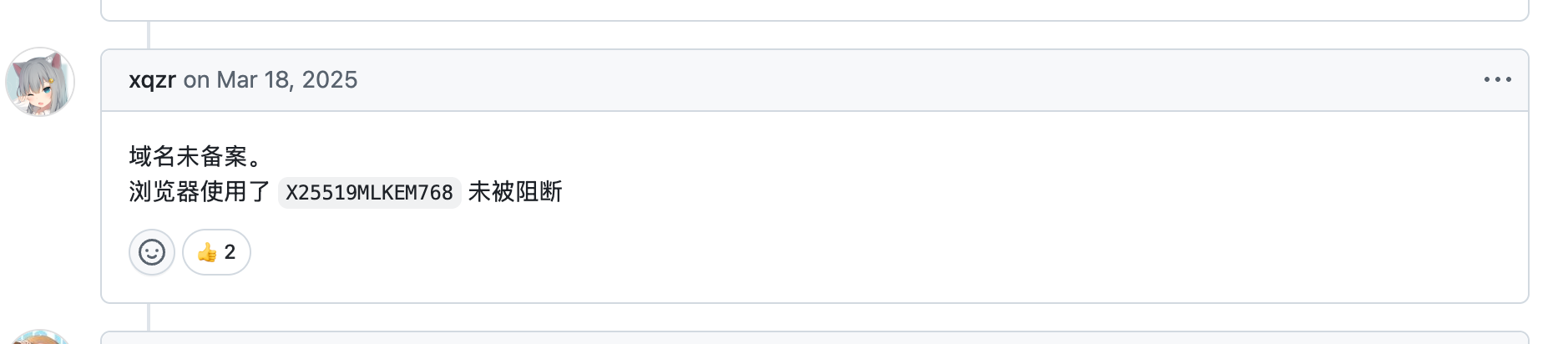
https://github.com/fatedier/frp/issues/4717
然后继续了解查下去 ,ai 如下介绍,X25519MLKEM768 是一种加密算法
X25519MLKEM768 是一种混合(hybrid)密钥交换算法,将经典密码学中的 X25519(椭圆曲线 Diffie-Hellman)与后量子密码学中的 ML-KEM-768(原 Kyber-768,NIST FIPS 203 标准)组合在一起,用于 TLS 1.3 等协议中的密钥协商
继续找资料,发现一篇 blog 报告阿里云网关漏洞,文章中给出的漏洞影响:(核心就是这个加密算法导致未备案域名访问阻断机制失效)
所有启用 PQC(X25519MLKEM768) 的 TLS 1.3 客户端均可无障碍访问未备案域名
- Chrome 124+ / Firefox 124+(默认启用) ---------> 我的 chrome 版本是 140+ 默认开启
- curl 8.6.0+(--tls13-ciphers 含 PQC 套件) ---------> 我的 curl 不支持 --tls13-ciphers curl: (4) A requested feature, protocol or option was not found built-in in this libcurl due to a build-time decision.
- 其他基于 BoringSSL 、 NSS 、 OpenSSL 3.2+并启用 PQC 的软件
未备案域名访问阻断机制简述
阿里云网关对目的 IP 为其云资源的 HTTPS 流量,会解析 TLS 握手阶段的 Client Hello 报文,提取 SNI(Server Name Indication) 字段,并与备案白名单比对。若域名未备案,则直接回复 TCP RST 中断连接。
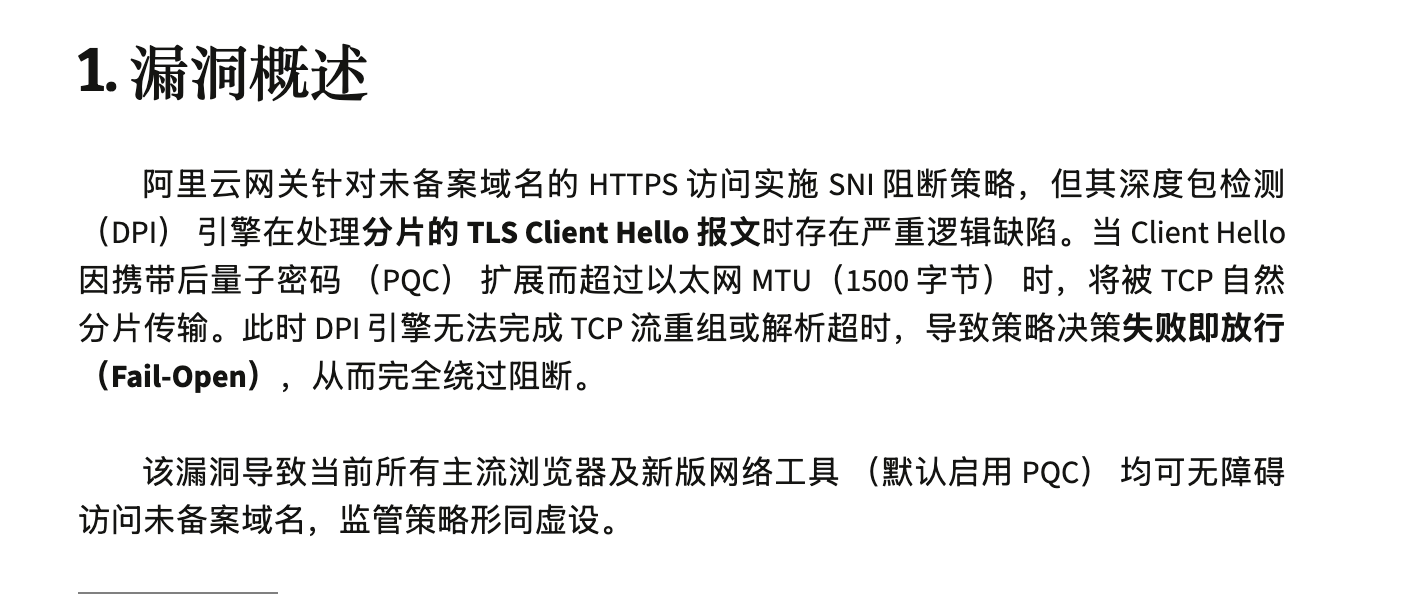
和我的上面 curl 自己网站的表现符合,发送 hello 报文后,被 RST 了
终于搞清楚了原因了!!:
我的浏览器支持 PQC X25519MLKEM768 加密算法,绕开了阿里云网关,我的curl不支持无法绕过被RST
我升级一下 curl 版本,再测试一下,成功了
curl -v https://blog.chiuili.top
* Host blog.chiuili.top:443 was resolved.
* IPv6: (none)
* IPv4: 47.116.23.198
*   Trying 47.116.23.198:443...
* ALPN: curl offers h2,http/1.1
* TLSv1.3 (OUT), TLS handshake, Client hello (1):
* SSL Trust Anchors:
*   Native: Apple SecTrust
*   OpenSSL default paths (fallback)
* TLSv1.3 (IN), TLS handshake, Server hello (2):
* TLSv1.2 (IN), TLS handshake, Certificate (11):
* TLSv1.2 (IN), TLS handshake, Server key exchange (12):
* TLSv1.2 (IN), TLS handshake, Server finished (14):
* TLSv1.2 (OUT), TLS handshake, Client key exchange (16):
* TLSv1.2 (OUT), TLS change cipher, Change cipher spec (1):
* TLSv1.2 (OUT), TLS handshake, Finished (20):
* TLSv1.2 (IN), TLS handshake, Finished (20):
* SSL connection using TLSv1.2 / ECDHE-ECDSA-AES256-GCM-SHA384 / x25519 / id-ecPublicKey
* ALPN: server accepted http/1.1
* Server certificate:
*   subject: CN=blog.chiuili.top
*   start date: Jun 12 11:52:32 2026 GMT
*   expire date: Sep 10 11:52:31 2026 GMT
*   issuer: C=US; O=Let's Encrypt; CN=YE2
*   Certificate level 0: Public key type EC/prime256v1 (256/128 Bits/secBits), signed using ecdsa-with-SHA384
*   Certificate level 1: Public key type EC/secp384r1 (384/192 Bits/secBits), signed using ecdsa-with-SHA384
*   Certificate level 2: Public key type EC/secp384r1 (384/192 Bits/secBits), signed using ecdsa-with-SHA384
*   Certificate level 3: Public key type EC/secp384r1 (384/192 Bits/secBits), signed using ecdsa-with-SHA384
*   subjectAltName: "blog.chiuili.top" matches cert's "blog.chiuili.top"
* OpenSSL verify result: 0
* SSL certificate verified via OpenSSL.
* Established connection to blog.chiuili.top (47.116.23.198 port 443) from 192.168.91.91 port 50876